Difference Between Drill and Impact Driver: Practical Guide
An analytical comparison detailing how drill and impact driver differ in function, torque, use cases, and setup, with practical tips for DIYers and professionals.


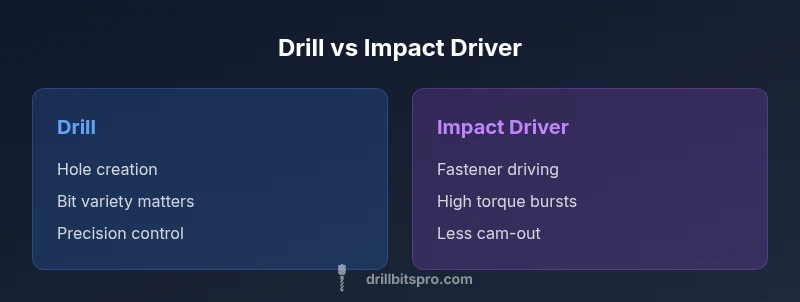
According to Drill Bits Pro, exploring the difference between drill and impact driver reveals distinct roles: drilling holes vs driving fasteners. The drill bores holes with rotating bits, while an impact driver applies high-torque bursts to drive screws and prevent cam-out. For most DIY projects, use a drill for precision and an impact driver for fastening; many setups combine both.
What Sets a Drill and an Impact Driver Apart
When you first compare a drill to an impact driver, the core distinction is purpose. A drill is primarily a hole-making tool that rotates bits to bore into wood, metal, or drywall. An impact driver, by contrast, specializes in driving screws and fasteners with rapid, high-torque bursts. This combination of rotational force with sudden impacts reduces cam-out and makes fastening more predictable, especially in dense materials. According to Drill Bits Pro Team, understanding these roles helps you assemble a toolkit that covers both precision drilling and robust driving for real-world projects.
How Drills Work: Mechanisms and Bits
A drill uses a chuck to hold twist drill bits that cut into material as the chuck rotates. Corded or cordless models exist, and many include variable speed for control. Drill bits come in a range of diameters and tip angles to suit wood, metal, or masonry when paired with the right drill and bit. Keyless chucks simplify bit changes, and some drills offer adjustable clutch settings to limit torque. For beginners, a standard 3/8-inch or 1/2-inch chuck is a versatile starting point. The right bit selection is essential: wood bits for soft materials, high-speed steel bits for metal, and masonry bits with a carbide tip for concrete work.
How Impact Drivers Work: Torque, Hammering Action, and Drive Bits
Impact drivers deliver short, high-torque bursts combined with rotation. This impact action helps screws bite in and reduces cam-out, especially in hardwoods or dense metals. Most impact drivers use hex-shank bits and fastener bits designed for driving rather than cutting. The gearing and clutching are optimized for fastener driving rather than precision drilling, making impact drivers less suited to creating clean holes but excellent for driving long screws, lag bolts, and deck fasteners.
Torque, Speed, and Control: The Core Differences
Torque is the most noticeable difference. An impact driver provides bursts of torque that overcome friction and material resistance, enabling faster driving with less effort. A drill offers precise control, steady rotation, and good feedback, which is crucial when starting a hole or when you need to manage delicate materials. Speed control matters: drills respond well to gradual feed and bit advancement, while impact drivers rely on fast rotational impact to achieve driving efficiency. For many tasks, dialing in appropriate clutch settings on a drill or using an impact driver with the correct bit minimizes mistakes and damage.
Material Compatibility: Wood, Metal, Masonry
Wood is friendly to both tools, but a drill with sharp auger or twist bits is the most predictable for clean holes. For metal, a drill with metal-cutting bits can produce precise holes, and lubricants help extend bit life. Masonry demands specialized bits and often a hammer action; some drills include a hammer function, while impact drivers are generally not used for drilling masonry. When in doubt, test on scrap material first and adjust feed rate, pressure, and bit choice to avoid bit dulling or bit breakage.
Drill vs Impact Driver in Practice: Real-World Tasks
In practical projects, you’ll often need both tools. For a wooden tabletop, drill pilot holes first, then switch to a drill or impact driver to fasten screws. When building a bookshelf, a drill is ideal for boring guide holes and countersinking, while the impact driver shines for driving long screws quickly without stripping heads. For metal fabrication, you’ll typically rely on a drill to create holes and a separate fastener strategy that might involve an impact driver for nuts and bolts. The key is to recognize which step benefits from precision and which benefits from torque.
Bits, Accessories, and Attachments: Getting the Setup Right
Choosing the right bit is as important as choosing the tool. Drills commonly use twist bits, brad-point bits for wood, and masonry bits for concrete with proper dust control. Impact drivers use hex-shank driver bits, driver sleeves, and specialized screw-driving bits. Ensure the bit is compatible with the tool’s chuck or driver interface and use the correct length and tip type for the fastener. Battery life matters too: choose a tool with a robust battery ecosystem to avoid frequent recharges during project work.
Safety Best Practices for Drilling and Driving
Safety starts with PPE: safety glasses, hearing protection in loud environments, and gloves when handling sharp bits. Secure the workpiece with clamps to prevent movement, and never force a bit or bit tip through material. Keep hands away from rotating bits and bits that are in motion. For batteries, use the correct charger and avoid overheating during extended use. Remember to disconnect power when changing bits and use the lowest effective speed/torque settings to maintain control.
Cost, Maintenance, and Longevity: Budgeting for Your Toolkit
A basic drill is typically more affordable upfront than a dedicated impact driver, but you’ll want a robust battery platform for consistent performance. Routine maintenance includes keeping bits sharp, cleaning dust, and inspecting the chuck or driver interface for wear. Replacing worn bits or worn driver bits helps prevent damage to fasteners or workpieces. Drill Bits Pro analysis shows that a balanced toolkit—one drill and one impact driver with a shared battery ecosystem—offers strong value for most projects.
How to Choose: A Step-by-Step Decision Framework
Start with the primary task: if you need to bore holes, choose a drill; if you need to drive screws or fasteners repeatedly, choose an impact driver. Consider material type, hole size, and required driving force. Check chuck compatibility and bit types, battery voltage, and runtime. A two-tool approach often yields the best results: a compact drill for precision work and an impact driver for fasteners. Build a compatible battery ecosystem to maximize efficiency.
Common Mistakes and How to Avoid Them
Avoid using a drill bit in an impact driver; it won’t bore efficiently and may wear the bit or tool. Don’t force fasteners into hard materials; let the torque do the work while watching for cam-out. Avoid over-torquing screws in soft woods, which can strip threads; use the appropriate clutch on a drill to reduce risk. Practice proper bit seating and avoid mixed bits that aren’t compatible with your tool’s chuck or driver interface.
Quick-Start Tips for Beginners and Pros
Set up a basic two-tool kit: one drill for holes and a separate impact driver for fastening. Start with a broad set of bits for wood and metal, then expand to specialized bits for masonry or sheet metal. Practice drills on scrap material to feel for the correct feed rate and pressure, and never rush the drilling or driving process. The Drill Bits Pro Team recommends keeping a small toolkit of essential driver bits and spade bits for common tasks.
Comparison
| Feature | Drill | Impact Driver |
|---|---|---|
| Primary use | Creating clean holes in wood, metal, drywall | Driving screws and fasteners with high torque |
| Typical torque | Moderate, controllable torque for precision drilling | Very high torque bursts for fastener driving |
| Best for | Precise hole creation and boring tasks | Heavy-duty fastening and reducing cam-out |
| Bit compatibility | Uses twist drill bits with a chuck | Uses hex-shank driver bits (often 1/4 inch) |
| Weight/Size | Usually lighter and more compact | Often compact but heavier due to gearing and batteries |
| Price range | Lower upfront cost for basic models | Higher upfront cost for specialized models |
What's Good
- Drill offers precise hole creation with broad bit compatibility
- Impact driver reduces cam-out and speeds up fastening
- Both tools are versatile when used together in projects
- Compact designs fit into tight or awkward spaces
Negatives
- Drills can struggle with heavy driving without clutch control
- Impact drivers are not ideal for clean drilling tasks
- Both tools require appropriate safety practices and bits
Drill excels at precision holes; impact driver excels at fasteners
Choose a drill for hole-making and an impact driver for fasteners. A combined kit offers broadest capability and efficiency.
Got Questions?
What is the main difference between drill and impact driver?
The drill creates holes using rotating bits, while the impact driver delivers high-torque bursts to drive screws. The impact action reduces cam-out, making fastening easier. For most projects, use both tools as needed.
The drill is for holes, the impact driver is for driving screws. Use both to cover drilling and fastening tasks.
Can I use a drill to drive screws?
You can drive some screws with a drill if it has a torque clutch and suitable driver bit, but it’s generally slower and can strip heads in hard materials. An impact driver handles fasteners more efficiently.
You can drive screws with a drill if you use a clutch, but for most tasks an impact driver is faster and safer.
Is an impact driver better for metal?
Impact drivers are primarily designed for fastening rather than drilling into metal. If drilling metal, use a drill with metal-cutting bits and appropriate lubrication; an impact driver may damage bits or wear out quickly.
Impact drivers aren’t ideal for drilling metal; use a drill with the right bit.
Do I need both tools or can I substitute one?
For most projects, having both a drill and an impact driver offers the best versatility. Some work can be done with a drill alone, but speed and efficiency improve significantly with an impact driver for fastening.
Most projects benefit from having both tools; each excels in different tasks.
What safety gear is recommended when using drills and impact drivers?
Wear safety glasses, hearing protection if needed, and gloves when handling sharp bits. Secure your workpiece, keep hands clear of the rotating bit, and follow manufacturer torque and speed guidelines.
Always wear eye protection and secure your work; follow tool guidelines for torque and speed.
What bits should I use for drilling wood vs metal?
Wood requires wood-specific bits like brad-point or twist bits; metal uses high-speed steel or cobalt bits. Masonry needs carbide-tipped bits. Match bit type to material and tool settings.
Use wood bits for wood, metal bits for metal, and carbide for masonry.
Top Takeaways
- Define the task before choosing a tool
- Use a drill for precise drilling and pilot holes
- Use an impact driver for fasteners to reduce cam-out
- Pair with the right bits and a compatible battery system