Difference Between Drill and Impact Driver: A Practical, Analytical Guide
Learn the difference between drill and impact driver, how each tool works, and when to use them. This analytical guide covers torque, chuck interfaces, material performance, and practical tips for DIYers and pros alike.


For most tasks, a standard drill is the versatile choice for drilling holes and light screw driving, while an impact driver shines at driving screws and stubborn fasteners with high torque. The difference between drill and impact driver lies in mechanism, torque delivery, and bit interface. Use a drill for boring holes and precise work; turn to an impact driver for fasteners and heavy driving where control matters least.
The difference between drill and impact driver: quick primer
The difference between drill and impact driver is often summarized as hole making versus fastener driving. In this section we explore the fundamental distinction and frame the discussion in terms of mechanism, task suitability, and expected outcomes. By examining these tools side by side, readers can translate technical specs into practical decisions on the job site. The difference between drill and impact driver becomes most visible when you shift from light duty tasks to demanding fasteners. Throughout this discussion, we will emphasize how each tool behaves in real-world scenarios, from a simple pilot hole to a long screw run in dense material. Drill users should recognize that speed and clutch control matter as much as torque, while impact drivers rely on rapid, high torque bursts to overcome resistance. In practice, the difference between drill and impact driver is a matter of matching the tool to the job, not a question of which one is better in every situation.
How the two tools actually work: core mechanics and design intent
The difference between drill and impact driver hinges on how the tool delivers energy to the bit. A drill typically uses a straightforward motor that turns the chuck with continuous torque. Variable speed and a clutch help regulate hole size, material, and finish. An impact driver, by contrast, combines rotation with percussive blows delivered by an internal hammer mechanism. This hammer repeatedly drives the bit forward in small bursts, effectively increasing effective torque without requiring the operator to push as hard. The difference between drill and impact driver therefore translates into a distinct driving experience: constant rotation for drilling, and alternating rotation plus impact for faster fastener installation. Professionals often appreciate the tactile feedback that the impact mechanism provides when breaking loose stubborn fasteners, while DIYers value the drill for its steadiness when starting holes and reaming.
Torque, speed, and control: key distinctions in practice
Understanding the difference between drill and impact driver requires looking at torque behavior, speed range, and control features. Drills typically offer a broad range of speeds and a clutch that allows precise depth control and bit protection. This makes drills ideal for wood, metal, and plastic work where clean hole profiles matter. Impact drivers deliver high torque in short bursts, which is efficient for driving long screws, lag bolts, and heavy fasteners. The result is faster fastening with less user fatigue, but it can feel aggressive on delicate materials. For the reader evaluating the difference between drill and impact driver, the practical takeaway is that torque delivery profiles—and the corresponding clutch or absence thereof—shape how each tool performs on different materials and with various bit types.
Chuck interfaces and bit compatibility: what fits where
One of the most visible parts of the difference between drill and impact driver is the chuck interface. Drills commonly feature a traditional chuck that accepts a wide range of bit diameters and types, including twist bits, brad point bits, and hole saws. This flexibility is central to drilling different materials. Impact drivers, however, favor a hex shank system or a quick-change collet that accepts screwdriver bits and some specialty bits with hex shanks. The difference between drill and impact driver here is about compatibility and speed of bit changes. In many setups, you can pair an impact driver with 1/4-inch hex shank bits for rapid bit swaps, while a drill accommodates larger bits through a chuck. For users, this means choosing the right accessory set to match the tool’s interface is essential for efficiency and accuracy on the job.
Drilling holes vs driving fasteners: the practical task matrix
The difference between drill and impact driver becomes most apparent when you map tool function to task. Holes in wood or metal are typically best tackled with a drill, which provides stable rotation, controlled speed, and a clutch to prevent overdriving or bit slippage. Fastening tasks, especially long or stubborn fasteners, favor an impact driver, which leverages short, powerful torque bursts to seat screws quickly with less effort. In mixed tasks, many professionals carry both tools and switch as the job requires. The reader should note that the difference between drill and impact driver is not about one tool replacing the other; rather, it is about selecting the appropriate tool for the specific phase of a project and the material involved.
Material considerations: wood, metal, masonry, and beyond
Different materials respond differently to drilling and driving. In soft wood, a drill with a sharp bit can produce clean holes with minimal tear-out, while an impact driver can surface-sate screws quickly in the same material. In metal, a drill with the appropriate bit is essential for clean holes, but the torque of an impact driver may cause thread deformation if used on metal screws without proper lubrication or predrilling. Masonry demands specialized bits and sometimes a hammer action, which is not a pure drill or a standard impact driver. The difference between drill and impact driver here is not only about tool capability but also about the bit selection and feed rate that optimize results for each material. Understanding these material responses helps align the tool choice with the expected outcome of the project.
Speed, torque, and control: tuning for success
When optimizing performance, you must understand how speed and torque interact in the two tools. A drill’s clutch and variable speed setting allow precise control over hole depth and bit temperature, reducing slips and wobble. An impact driver’s torque bursts are especially useful for fasteners in dense materials, but without careful seating and bit selection, you risk cam-out or stripped screws. The difference between drill and impact driver thus lies in how you balance speed and torque to achieve the desired result. In practice, calibrate the tool to the material and fastener length, test on scrap pieces, and always use the correct bit and accessories to minimize damage and maximize efficiency.
Practical tips for beginners: getting up to speed quickly
For newcomers, the difference between drill and impact driver becomes intuitive with a few hands-on tips. Start with a quality drill bit compatible with your material, and practice steady feeds and shallow holes before pursuing deeper work. When moving to fasteners, switch to the impact driver and use a proper hex bit, maintaining a light but steady pressure to avoid cam-out. Maintain your tools by keeping bits sharp, lubricating threading as needed, and storing accessories in clearly labeled cases. The difference between drill and impact driver is best learned by using both tools on the same material under similar conditions, noting how each tool handles torque, control, and bit engagement. Over time, the distinctions become second nature, and you will instinctively know which tool to reach for in a given situation.
Safety considerations and best practices for two essential tools
Safety is an integral part of using both drills and impact drivers. Wear eye protection, keep hands clear of the blade and bit path, and secure the workpiece with clamps. Use appropriate personal protective equipment such as hearing protection when working with loud tools and dust masks for dusty materials like drywall and masonry. When considering the difference between drill and impact driver in unsafe conditions, remember that controlled motion and stable stance reduce the risk of slips and wobble. Regularly inspect batteries, chargers, and bits, replacing worn parts to prevent failures during critical tasks. The overarching principle is to follow the safety guidelines specific to each tool while applying the right technique for the material and operation at hand.
Common mistakes and how to avoid them
Some common mistakes include trying to drive too long fasteners with a drill, overfeeding a bit, or using an impact driver for delicate drilling tasks. Each error stems from not aligning the task with the correct tool. To avoid these mistakes, practice on scrap pieces, switch to the appropriate tool for drilling or driving, and select bits with the correct shank type. The difference between drill and impact driver becomes a practical guideline: don’t force a tool beyond its intended use. Instead, use the correct tool for the job and maintain steady technique for cleaner work and longer tool life.
Real-world project scenarios: practical workflows and tips
Consider a project like building a small wooden deck. Start with a drill to create pilot holes for deck screws, preventing wood from splitting. When you switch to fasteners, use an impact driver to drive the screws efficiently into the joists. In metalwork, rely on a drill for holes in brackets and use the impact driver for attaching fasteners with hex bits, ensuring screws seat fully without stripping. The difference between drill and impact driver becomes a workflow advantage: each tool plays a specific role at the right phase of the project. Building a practical toolkit means recognizing when to swap tools to maintain accuracy, speed, and safety.
Maintenance, longevity, and tool care for both tools
Maintenance is essential to preserve the performance of both drills and impact drivers. Regularly clean dust and debris from vents, check the chuck for wear, and ensure bearings are rotating smoothly. Battery care is equally critical; follow manufacturer guidelines for charging, storage, and replacement cycles. The difference between drill and impact driver is not only about how you use them but also how you care for them. Proper storage, timely bit replacement, and routine inspection extend tool life and maintain consistent performance over many projects. By keeping your tools in top condition, you minimize downtime and maintain reliability on demanding tasks.
How to acquire and balance two essential tools on a budget
For DIY enthusiasts and professionals, balancing cost with capability means evaluating whether you should buy a drill or an impact driver first, or both as a set. If you anticipate more drilling than driving, prioritize a drill with an adjustable clutch and a broad speed range. If you expect frequent fastener tasks or tough materials, an impact driver becomes the more valuable initial investment. In a balanced toolkit, the two tools complement each other and reduce the time spent on each project. The difference between drill and impact driver thus informs budgeting strategy, ensuring you invest in the right tool for your typical tasks while maintaining a plan for expanding capabilities over time.
Final thoughts: aligning tool choice with project goals
The difference between drill and impact driver can be boiled down to function: holes versus fasteners. Yet the real value comes from how you apply each tool to material, bit type, and technique. A well-chosen combination increases efficiency, reduces fatigue, and improves safety. For professionals, this means a mindset that prioritizes task-specific tool selection and regular maintenance. For DIYers, it means building confidence through hands-on practice and smart accessory choices. In every case, understanding the difference between drill and impact driver equips you to plan projects with greater clarity and fewer surprises on site.
Comparison
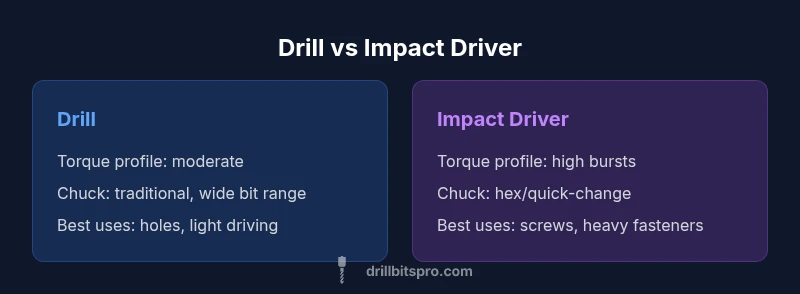
| Feature | Drill | Impact Driver |
|---|---|---|
| Torque delivery | Consistent torque suitable for drilling and light driving | High torque bursts optimized for driving fasteners |
| Chuck / bit interface | Traditional chuck accepting a wide range of bits | Hex shank or quick-change system for fast bit swaps |
| Best uses | Hole boring, countersinking, small pilot holes | Driving screws, lag bolts, stubborn fasteners |
| Control and feedback | Clutch and variable speed for precision and depth control | Impact mechanism with rapid torque impulses |
| Weight and balance | Varies by model, often balanced for drilling tasks | Typically compact with strong torque output |
| Bit compatibility | Fits standard bits via chuck, requires bit sizes to match chuck | Best with hex bits and screwdriver bits |
What's Good
- Versatile drilling capability for holes of various sizes
- High torque assist for fastener installation and heavy driving
- Clutch and speed controls improve precision in drilling
- Different interfaces allow fast bit changes and efficiency
Negatives
- High torque can feel aggressive for delicate drilling
- Impact drivers may damage softer materials if misused
- Specialty bits and adapters can add cost
- Drills are generally slower at fastener driving than impact drivers
Use both tools for optimal results
Drills excel at precision drilling and light driving, while impact drivers excel at fasteners with high torque. The best approach is to employ each tool for its strengths and combine them for efficient, high-quality workmanship.
Got Questions?
Can I use an impact driver as a drill for light holes?
An impact driver can bore holes with certain bits, but it is not designed for precision drilling. It lacks the consistent rotation and depth control of a drill, which can lead to irregular holes and increased bit wear. For most drilling tasks, use a dedicated drill and switch to an impact driver for driving fasteners when needed.
An impact driver can bore with some bits, but it’s not ideal for precision drilling. Use a drill for holes and an impact driver for screws.
What is the main difference between drill and impact driver?
The main difference is how they deliver power. A drill provides steady rotation for holes and light driving, while an impact driver delivers rapid torque bursts to drive fasteners efficiently. This distinction influences material compatibility, control, and desired speed.
Drills rotate steadily for holes; impact drivers use torque bursts for fasteners. That difference guides which tool to choose.
Are there tools that combine drilling and driving capabilities?
Yes, combi tools and hammer drills offer mixed capabilities, but they may compromise on depth control or torque delivery compared to dedicated drills or impact drivers. For most tasks, keep the two tools separate to maximize performance.
There are combos, but dedicated drills and impact drivers are usually better for each job.
What bits work best with each tool?
Drills generally accept a wide range of drill bits via a chuck, while impact drivers excel with hex shank bits and screwdriver bits. Using the correct bit type for each tool minimizes wear and improves performance.
Drills take many bits; impact drivers use hex bits and driver bits for best results.
Is torque the only factor when choosing between these tools?
Torque is crucial, but other factors like control, bit interface, and material compatibility matter too. Consider the job’s precision needs, the fasteners involved, and the material you’re working with when deciding which tool to use.
Torque matters, but control and material compatibility matter as well.
Top Takeaways
- Identify task first: drill for holes, impact for fasteners
- Match torque profile to material and fastener size
- Use correct bit types and shanks for each tool
- Practice handling to minimize cam-out and tear-out
- Maintain tools and accessories for longevity