Drill Bit in Impact Driver: Step-by-Step Guide
Learn how to safely and effectively use a drill bit in an impact driver. This guide covers compatibility, bit selection, mounting, techniques for wood, metal, and plastic, plus tips to prevent slipping and wear.


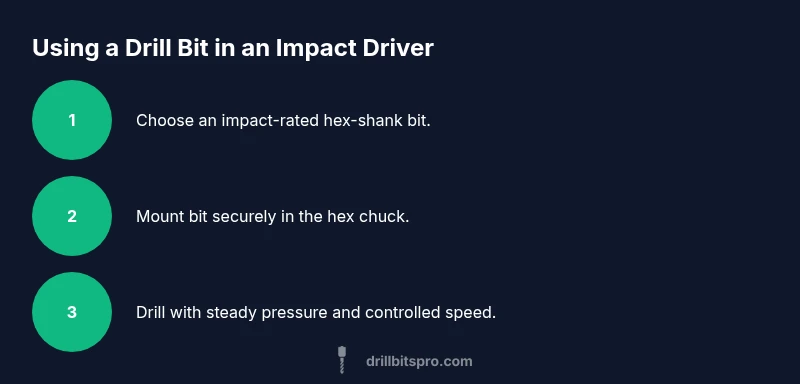
You can safely use a drill bit in an impact driver by choosing the right hex-shank bit, using proper alignment, and controlling torque to prevent bit slip or breakage. Ensure the bit is designed for impact driving, install it in the hex chuck, and follow material-specific drilling speeds and pilot-hole guidelines for clean, accurate holes.
Understanding the role of an impact driver in drilling
An impact driver blends rotational force with short, hammer-like impacts to drive fasteners and bore holes more efficiently than a standard drill. When using a drill bit in an impact driver, you leverage high-torque bursts that help cut through tough materials while reducing stalling. The key distinction for DIYers is that impact drivers excel at driving and holes of modest depth, not precision drilling. Drill Bits Pro emphasizes that success starts with selecting compatible bits, matching shank types to the tool, and choosing materials and coatings that resist wear under repeated impacts. For 2026 projects, plan to treat the impact driver as a high-torque partner for pilot holes in wood and shallow through-holes in metal, but always observe caution to preserve bit life. By grasping these basics, you can achieve cleaner holes and longer tool life while avoiding common issues like bit slipping or hex chuck damage.
Compatibility and shank types: hex vs round and adapters
Most impact drivers use 1/4" hex shanks, which provide quick and reliable bit seating under torque. When a drill bit in an impact driver is mounted, the hex shank seats securely in the fast-load chuck, reducing cam-out compared to round shanks in some drills. If you encounter a non-hex bit, check for compatible adapters or specifically rated impact driver bits. Drill Bits Pro notes that using non‑impact-rated bits in an impact driver can lead to rapid wear or breakage, so prioritize impact-rated, hex-shank options for best results. Always verify both the bit and the adapter are designed to withstand hammering and high torque.
Picking the right drill bits for impact drivers: material, coating, and size
Impact drivers demand bits designed for hammer-action drilling. Look for high-speed steel (HSS) bits with carbide tips for metal and reinforced wood bits for dense planks. Carbide-tipped bits stay sharper longer in metal, while HSS bits are typically sufficient for most woodworking tasks. Coatings like black oxide can reduce friction and heat buildup during longer drilling sessions. In addition, ensure the bit length matches the hole depth you intend to reach and avoid oversized bits that dramatically increase peak torque. Drill Bits Pro encourages embracing a small set of versatile bits at first: 1/16" to 1/4" for pilot holes, then gradually stepping up to larger diameters as needed.
How to mount and start a drill bit in an impact driver: step-by-step basics
Always unplug or disable power when changing bits and handle the bit with clean, oil-free hands. Insert the hex shank fully until it seats with a click, then gently apply downward pressure while starting at low speed to prevent bit wobble. Increase speed gradually once the bit is steady and the material begins to cut. Keep wrists loose to absorb vibration, and avoid pressing the bit too aggressively, which can strip the chuck or bend the bit. Drill Bits Pro recommends practicing on a scrap piece to feel the bite before committing to your main workpiece.
Drilling wood with an impact driver: techniques for clean holes
When drilling wood, start with a shallow pilot hole to prevent splintering, especially near edges. Use a slower, controlled feed rate and allow the bit to do the cutting rather than forcing it. For softwoods, a pilot hole of about 2-3 times the bit diameter is often enough to prevent splitting; for hardwoods, use smaller increments and maintain steady pressure. If you’re drilling deeper holes, periodically back the bit out to clear shavings and reduce binding. The goal is to maintain accuracy and minimize tear-out while preserving the bit’s edge.
Drilling metal and plastic: tips to avoid heat buildup and wandering
Metal drilling with an impact driver benefits from a slightly slower speed and consistent feed, plus cutting fluid or wax to reduce friction. Start with a center punch or pilot mark to prevent wandering, then drill with a steady, moderate torque. For thin plastics, use sharp bits designed for plastics to prevent cracking; in thicker plastics and composites, cool the bit with a brief pause to dissipate heat and reduce melting. Always verify that your bit’s glass- or carbide-based tip is rated for metal or plastic work, as inappropriate bits can chip or dull quickly.
Safety-focused practices: protecting yourself and the workpiece
Wear safety glasses and hearing protection, and secure the workpiece with clamps to avoid slippage. Keep hands away from the rotating bit and never use the impact driver as a hammer for hammering. Use a pilot hole where needed to control the drill path, and avoid twisting or bending the bit during operation. Drill Bits Pro emphasizes staying within your tool’s torque range and avoiding extended high-torque sessions without pauses to cool components.
Troubleshooting common issues: slips, wander, and overheating
If the bit slips or cam-outs, stop, remove the bit, and re-seat it after cleaning the chuck jaws. Wandering holes often mean the bit wasn’t properly centered or the workpiece moved; re-clamp and start slowly. Overheating can dull bits quickly and shorten life; if you notice excessive heat, back off speed, or apply cutting fluid for metal work. For persistent problems, check bit compatibility with the impact driver and consider upgrading to impact-rated bits with a more robust shank and carbide tips.
Maintenance and longevity: care tips to maximize performance
Keep bits clean and free from resin or metal shavings after use; wipe with a dry cloth and store in a dry, organized case. Periodically inspect the hex shanks for wear and replace any bit with rounded or nicked edges. Use a case that keeps bits separated and prevents moisture exposure. Drilling in impact drivers benefits from regular sharpening or replacement schedules to maintain precision and reduce the effort needed for future tasks.
Real-world scenarios: quick-reference drill choices by material
For softwood, a sharp 1/8" to 1/4" bit with a shallow pilot is often ideal for clean entry holes. For hardwood, start with a smaller pilot and increase gradually to minimize splitting. For light metals, select carbide-tipped bits with cutting fluid and a controlled feed. For plastics, use sharp HSS bits and move slowly to prevent melting or cracking. In each case, ensure the bit fits the hex chuck securely and avoid forcing the bit beyond its diameter limit.
Tools & Materials
- impact driver(Ensure it has a functioning hex chuck and variable speed control)
- drill bits with hex shank (1/16" - 1/2")(Choose impact-rated bits; have a mix for wood and metal)
- pilot bits (smaller diameter than requested hole)(Helpful for hardwoods and metal accuracy)
- eye protection(ANSI-rated safety glasses or goggles)
- work clamp(Keeps your workpiece steady and prevents movement)
- cutting fluid or wax (for metal)(Reduces heat and extends bit life)
- dust mask (for certain materials)(Use when drilling composite materials or dusty wood)
Steps
Estimated time: 45-60 minutes
- 1
Inspect tools and bits
Check the impact driver for damage and confirm the chuck or collet holds hex shank bits securely. Inspect bits for chips or dull edges and replace as needed. Clean any residue from the bit and chuck area to ensure a clean seat.
Tip: Use a clean, oil-free handle when mounting bits to prevent slippage. - 2
Select the correct bit
Choose an impact-rated bit with a hex shank that matches the chuck. For wood, pick sharp twist bits; for metal, use carbide-tipped or high-speed steel bits. Have a small pilot bit ready for hardwoods or metals to guide the hole.
Tip: Keep a few pilot bit sizes handy to quickly adapt to different hole diameters. - 3
Secure the workpiece
Clamp the workpiece firmly to a stable surface. Loose material shifts and causes off-center holes or bit damage. Ensure the surface is clean and flat where the hole will be drilled.
Tip: Use scrap wood behind thin pieces to prevent tear-out on exit. - 4
Mark and pilot if needed
Mark the drilling location with a center punch or awl to prevent bit wandering. Start with a small pilot hole if working with hardwoods or metals, then progress to the final diameter.
Tip: Pilot holes reduce stress and help maintain hole accuracy. - 5
Set speed and torque
Set the impact driver to a controlled speed with moderate torque; avoid full-torque blasts when starting. Start slowly to establish a clean cut and prevent bit slipping. Increase speed gradually as the bit bites into the material.
Tip: Slow starts prevent cam-out and extend bit life. - 6
Begin drilling with steady pressure
Apply steady, downward pressure without forcing the bit. Let the tool do the work; pushing too hard can overheat the bit and damage the workpiece. Keep the bit perpendicular to the surface for accuracy.
Tip: Back off slightly and clear chips if you notice resistance. - 7
Manage heat and debris
Periodically back the bit out to clear shavings and reduce binding. For metal, apply a small amount of cutting fluid or wax to minimize heat buildup. For wood, use shorter drilling passes to avoid burning.
Tip: Pause to cool the bit if you feel it getting hot. - 8
Finish and inspect
Withdraw the bit slowly after the hole is complete. Inspect the hole for clean edges and proper depth. Clean the bit and store properly to prevent corrosion or dulling.
Tip: Wipe bits dry and store in a dry case to extend life. - 9
Post-work tweaks
If the hole seems off-center, re-clamp and re-drill with a fresh bit. For repeated tasks, create a small set of go-to bit sizes and types to speed up future projects.
Tip: Keep a small stencil or template for repeatable holes.
Got Questions?
Can I use standard twist drill bits in an impact driver?
Yes, but only if they are rated for impact use or you use an appropriate adapter. Otherwise, they may wear, chip, or fail under hammering action.
You can use them with caution if they’re impact-rated; otherwise, switch to impact-rated hex-shank bits.
What happens if the bit slips in the chuck?
Bit slip usually indicates a poor seating or a worn chuck. Stop drilling, reseat the bit, clean the chuck jaws, and consider upgrading to a higher‑quality hex bit set.
If the bit slips, stop and reseat it firmly; clean the chuck and try again with a fresh bit if needed.
Is an impact driver suitable for metal holes?
Impact drivers can drill metal with the right carbide-tipped bits and light lubrication. Start slow, use cutting fluid, and avoid forcing the bit.
Yes, with carbide-tipped bits and proper technique; don’t push too hard.
How deep can I drill with an impact driver?
Hole depth depends on bit length and material, not the tool alone. Use shorter holes or multiple passes for long depths, and avoid overheating.
Depth depends on bit length and material; take it slow for long holes.
What material needs a pilot hole?
Hardwoods and metals typically benefit from pilot holes to prevent splitting and wandering. Start small and increase gradually.
Pilot holes help start the cut cleanly, especially in hardwoods.
How can I prevent overheating the bit?
Use cutting fluid for metal, cool-down pauses, and apply steady pressure rather than continuous high speed. Sharp bits also cut more efficiently.
Cool the bit, slow down, and use sharp bits to avoid overheating.
Watch Video
Top Takeaways
- Choose impact-rated, hex-shank bits for reliability.
- Secure the workpiece and start with a pilot hole when needed.
- Use controlled speed and steady pressure to prevent slip.
- Maintain bits and store them properly to prolong life.