How to Fit a Drill Bit into an Impact Driver: Step-by-Step Guide
Learn how to correctly fit drill bits into an impact driver with hex shanks or adapters. This step-by-step guide covers compatibility, safety, and best practices for DIYers and pros in 2026.


The quickest way to fit a drill bit into an impact driver is to use a hex-shank drill bit or a purpose-built adapter that converts the drive to a compatible chuck. Ensure the bit is impact-rated, insert fully into the hex chuck or adapter, and tighten securely. Always double-check compatibility before use.
Why direct-fit with a round drill bit often fails
The modern impact driver uses a 1/4-inch hex drive designed for hex shank bits. Forcing a round-shank twist drill into this system can lead to slippage, cam-out, damaged bits, or a damaged driver’s drive head. According to Drill Bits Pro, the safest and most reliable approach is to either use drill bits that come with a hex shank or employ a purpose-built adapter that preserves the hex interface. This ensures positive engagement, reduces heat buildup from slipping, and maintains torque transfer to the bit. DIY enthusiasts and professionals alike benefit from understanding the practical limits of the tool and avoiding improvised hacks that can void warranties or compromise safety. By choosing the right bit or adapter, you can keep both your material and your tool in good condition for longer.
How the drive system in impact drivers differs from traditional drill chucks
Impact drivers rely on a high-trequency hammering mechanism and a compact, high-torque hex drive. Unlike a conventional drill with a keyed or keyless chuck, an impact driver’s hex interface is optimized for quick bit changes with minimal wobble when a hex shank is used. This means that using a round bit or a non-hex attachment can cause uneven engagement, increased vibration, and potential bit breakage. When you select bits that match the hex drive, you reduce the risk of cam-out and you improve the overall drilling accuracy. For best results, always confirm your tool’s drive type and the bit’s shank format before starting a project. Drill Bits Pro’s guidance emphasizes matching shanks to drives for safe operation and better outcomes.
Options for fitting a drill bit into an impact driver
There are two main practical routes for using drill bits with an impact driver. The first is to use hex-shank drill bits, which are designed to plug directly into the hex drive. The second is to employ an adapter or accessory that converts the hex drive to a chuck-like interface capable of holding round bits more securely. Each option has pros and cons:
- Hex-shank drill bits: Quick changes, minimal wobble, ideal for pilot holes and light drilling in wood, metal, or plastic when the bit type suits the material.
- Adapters: Provide compatibility with round bits or standard twist drills, but you must choose an adapter rated for impact use and ensure it locks firmly. Always check manufacturer guidance for your specific model.
Safety considerations and best practices
Wear safety glasses and use a solid work surface. Keep hands away from the bit while the tool is running, and start at a low speed to confirm engagement before applying full torque. Use light pressure and let the bit do the work; forcing the bit can cause it to slip, break, or cause kickback. Verify that the drill bit is rated for impact use and that any adapter is securely attached with no play. Regularly inspect hex shanks for wear and replace worn bits to prevent slippage during operation.
Tools & Materials
- 1/4-inch hex-shank drill bits (wood, metal, or masonry as appropriate)(Prefer impact-rated bits designed for use with impact drivers)
- Impact-rated drill bit adapters (optional for round bits)(Select adapters rated for impact use and with a secure locking mechanism)
- Impact driver with 1/4-inch hex drive(Ensure it’s in good working order and has a functional quick-change system)
- Clamps or a vise for stabilization(Helpful for keeping material steady during drilling)
- Safety glasses or face shield(Always protect eyes from chips and debris)
- scrap wood or metal for testing(Practice on waste material to validate fit before working on the final piece)
- Workbench lighting(Good illumination reduces mistakes)
Steps
Estimated time: 20-40 minutes
- 1
Confirm drive type and bit compatibility
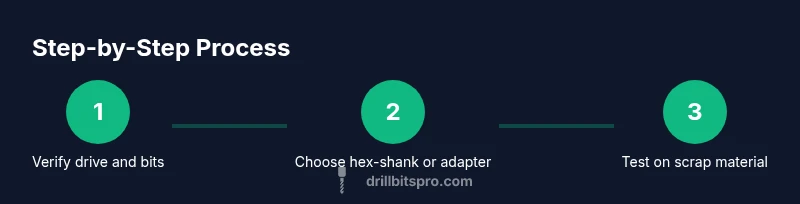
Inspect your impact driver’s 1/4-inch hex drive and verify that you have hex-shank bits or a compatible adapter. Check the bit’s labeling for 'impact-rated' and confirm the shank size matches the tool’s drive. This initial check prevents wasted time and avoids forcing incompatible bits into the drive.
Tip: If you’re unsure, consult the user manual or manufacturer’s website for your model’s compatibility list. - 2
Choose the correct bit or adapter
Select hex-shank drill bits for direct engagement, or pick a proven impact-rated adapter if you need to use a round-bit. Ensure the bit length and diameter are suitable for your material and drilling purpose. Avoid trying to force a large bit into a small drive.
Tip: Test the chosen option on scrap material before committing to the final piece. - 3
Prepare the bit and tool
Clean any dust from the bit shank and the hex drive. If using an adapter, inspect locking surfaces for burrs or damage. A clean interface improves grip and reduces the chance of slippage during operation.
Tip: Lightly wipe with a dry cloth; do not use lubricants on the interface as they can reduce grip. - 4
Insert and seat the bit
Insert the hex-shank bit fully into the drive until it seats firmly. If using an adapter, insert the bit into the adapter and then secure the assembly into the hex drive. Avoid partial seating which can cause wobble and poor drilling performance.
Tip: Give a gentle pull on the bit to confirm it is locked before starting the tool. - 5
Test engagement on scrap material
With the material clamped, set the impact driver to a low speed and apply light pressure. Listen for a clean bite and observe for any unusual wobble. If the bit shifts or slips, stop and re-seat or switch to a different bit/adapter.
Tip: If you hear grinding or see heating, stop and inspect the interface immediately. - 6
Proceed with drilling on the project piece
Drill with controlled, steady pressure. Let the bit do the work; don’t push aggressively. For pilot holes, start with a smaller bit and step up to the final diameter as needed. Periodically remove chips to prevent clogging and overheating.
Tip: Use pilot holes for hard materials to reduce bit stress and extend life. - 7
Withdraw, inspect, and store properly
After completing the hole, switch off the tool and back out the bit calmly. Inspect for dullness, heat, or wear on the shank. Wipe the bit clean, store in a designated case, and keep adapters segregated from hex bits to prevent confusion.
Tip: Record any wear notes in your tool log to plan replacements before the next project.
Got Questions?
Can I use any drill bit in an impact driver, or do I need a special type?
Not all drill bits are suitable for impact drivers. Choose bits labeled 'impact-rated' or designed for impact use. If you must use a round bit, pair it with a compatible adapter rated for impact use and ensure it locks securely.
Use only impact-rated bits with your impact driver, or use a compatible adapter for round bits.
What is the difference between hex-shank and round-shank drill bits for impact use?
Hex-shank bits engage the hex drive directly for quick changes and stable engagement. Round-shank bits require an adapter to fit the hex drive, and that adapter must be rated for impact use to avoid slippage.
Hex bits fit directly; round bits need a proper impact-rated adapter.
Do I need a special adapter to use drill bits in an impact driver?
If your drill bits are round, you may need an adapter to convert the hex drive to a biting, secure interface. Choose adapters built for impact tools and follow the manufacturer’s installation instructions.
Yes, you may need a proper impact-rated adapter for round bits.
Are there safety risks when fitting a drill bit into an impact driver?
Risks include bit slippage, bit breakage, and kickback if the bit is not properly seated or if an adapter is improper. Always wear eye protection and test on scrap material before working on the real piece.
The main risks are slipping and breakage; always test first and wear protection.
How can I tell if a drill bit is compatible with my impact driver?
Check the tool’s manual for drive type and bit compatibility. Look for ‘impact-rated’ on the bit label and confirm the shank size matches the drive or adapter you plan to use.
Check the manual and bit labeling for compatibility.
What maintenance should I perform after using adapters with an impact driver?
Inspect adapters for wear, burrs, and fit. Clean interfaces and store properly. Replace worn parts to prevent future slippage and ensure consistent performance.
Inspect, clean, and store adapters; replace worn parts as needed.
Watch Video
Top Takeaways
- Use hex-shank bits for direct fit in impact drivers.
- Adapters enable use of round bits but must be impact-rated.
- Always verify secure seating before drilling.
- Test on scrap material to avoid damage to final work.