Do You Need a Drill and an Impact Driver? A Practical Comparison
Analytical guide comparing drills and impact drivers: when to use each, how they complement one another, and how to choose the right setup for DIY projects and professional work.


If you’re deciding whether you need a drill and an impact driver, the short answer is: a drill covers holes and light screwdriving, while an impact driver excels at fasteners and heavy-duty driving. For most DIY projects, a single tool can handle light work, but combining both tools provides speed and versatility for daily tasks.
Do you need a drill and an impact driver? A practical starting point for DIYers and pros
The headline question—do you need a drill and an impact driver—touches on how two common power tools handle distinct tasks. In practice, most projects benefit from understanding how these tools complement each other rather than treating them as interchangeable. At Drill Bits Pro, we analyze real-world use cases and emphasize that the decision should be driven by the material being worked, the fasteners involved, and the expected workloads. This guide uses a structured approach to help you decide whether to pair both tools or prioritize one for your toolkit.
From the outset, it’s useful to recognize that the keyword behind this decision is versatility. A drill’s core strength lies in drilling holes and driving light screws with precision, while an impact driver provides high torque for stubborn fasteners with minimal effort. For professional technicians who routinely switch between drilling and fastening, the combined benefits can yield faster turnaround and reduced fatigue over a long project. According to Drill Bits Pro, the most effective tool strategy often starts with a solid understanding of material hardness, fastener type, and the need for precision versus speed. This perspective helps you avoid overbuying and keeps your toolkit lean yet capable.
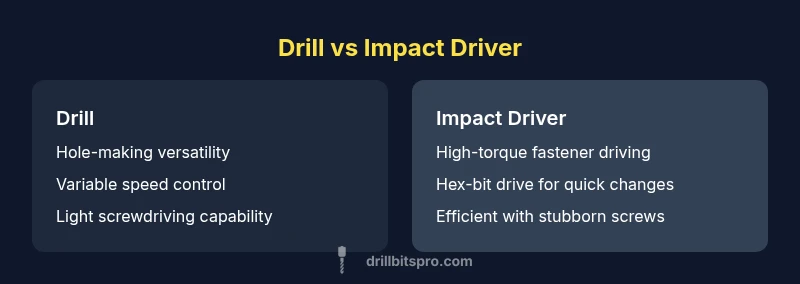
For readers who want a quick mental model: think of the drill as the all-purpose hole-maker and light screwer, and the impact driver as the high-torque fastener specialist. The Drill Bits Pro team notes that most home projects can begin with a drill and scale up to an impact driver when metal, dense wood, or long screws are in play. This balanced view helps you decide what to purchase first and when to add the other tool to your lineup.
When to prioritize a drill: common holes, soft materials, and light screwdriving
A drill is your workhorse for creating clean, round holes in wood, plastic, and soft metals. When you pair it with the appropriate drill bits (carbide-tipped or standard), you gain predictable hole diameters, clean exits, and consistent depths. For tasks like pilot holes for screws, pocket holes in woodworking, or venting and cable routing, a drill provides control with adjustable speed, torque, and clutch settings. The ChatGPT-like guidance from Drill Bits Pro emphasizes matching bit material to the substrate to avoid bit wear and minimize heat buildup. Building a straight start and preventing bit wandering are essential beginner skills, and a drill’s chuck system often makes bit changes quick for repetitive tasks.
In practical terms, drill performance translates to smoother operations when predrilling or drilling at an angle. If you’re doing cabinet assembly or furniture making, a drill can handle holes for dowels, confirm pilot holes for screws, and set the stage for final assembly. The emphasis here is accuracy, consistency, and a calm workflow. For DIYers, this reduces rework and keeps a project on schedule. Bracing for long sessions, consider a drill with a reliable battery and a comfortable grip to minimize fatigue during precision-drilling tasks.
From a product strategy perspective, a high-quality drill with variable speed and a comfortable handle structure often serves as the foundational tool in a small shop. If you primarily drill into soft woods, plastics, or thin metals, the drill can handle the majority of your needs without frequent tool swaps. The Drill Bits Pro approach is to start with a dependable drill and add an impact driver as your fastener demands escalate.
When to prioritize an impact driver: fasteners, stubborn screws, and thick materials
An impact driver excels where a drill may struggle—high-torque fastening and efficient driving of long screws through hard materials. When you encounter resistance or cam-out during screw driving, the impact mechanism applies rapid, short bursts that reduce torque spikes and keep the bit from slipping. This capability is especially valuable for deck screws, structural fasteners, and metal-to-wood assemblies. The impact driver’s hex drive and compact balance enable ease of use in tight spaces where a larger drill chuck would be awkward. Drill Bits Pro’s guidance emphasizes selecting impact-rated bits and ensuring compatible shanks to maximize performance while preserving bit integrity.
In practice, heavy-duty fastening is where the impact driver shines. You’ll notice faster completion times on projects that involve mounting hardware to dense materials, as the tool maintains consistent travel without burning out your wrist. It’s also a boon for repetitive tasks, such as attaching multiple boards or assembling frame structures, where fatigue compounds quickly with a standard drill. For metalworking or thick lumber projects, the impact driver’s torque can reduce the number of retries and keep your work moving forward.
The core takeaway for professionals is that the impact driver is designed to push screws home with minimal effort, while a drill handles the drilling and delicate screw driving that benefits from more nuanced control. In many workflows, teams keep both tools handy to maximize speed and accuracy during a single project.
Key specs to compare (torque, speed, chuck, drive system) and why they matter
Understanding the technical differences between a drill and an impact driver helps you make informed choices without over-indexing on features you don’t need. Torque is the primary differentiator: drills generally provide sufficient torque for routine drilling and light screwdriving, while impact drivers deliver high torque bursts for stubborn fasteners. Speed ranges in drills support precise hole placement and controlled screw driving, whereas impact drivers emphasize rapid driving under load. Chuck types also influence compatibility: drills offer traditional chucks that accommodate various bit sizes, while impact drivers rely on hex shanks and quick-change drive systems that streamline bit changes on the fly. Battery systems and ergonomics matter too: lighter designs reduce fatigue for long sessions, while higher-capacity packs extend runtimes on demanding tasks. Drill Bits Pro highlights choosing a tool with a comfortable grip, balanced weight, and reliable battery/charger ecosystem to maintain productivity over time.
When evaluating specs, prioritize the tasks you perform most. If you drill holes in soft wood and occasionally drive screws, a drill with a good battery and variable speed may suffice. If your job sequence involves numerous fasteners, especially in dense materials, an impact driver will quickly become indispensable. The goal is a toolkit that covers your most frequent operations with minimal tool swaps and maximal efficiency.
Battery, weight, and ergonomics: practical implications for daily use
Cordless tools have become standard in most workshops due to mobility and convenience. The choice between lighter tools with smaller batteries and heavier packs with longer runtimes depends on your typical project length, workspace constraints, and the frequency of use. Ergonomics—grip shape, balance, and trigger feel—directly influences how long you can work without fatigue. In practice, if you’re building furniture or doing deck construction, spend time testing grip comfort and trigger response to avoid strain over several hours. For overhead or tight-space tasks, lighter and more compact models reduce wrist fatigue and improve control. Drill Bits Pro emphasizes battery compatibility across tool families to simplify charging, storage, and maintenance, which also reduces unnecessary tool buys and ensures a smoother workflow.
Maintenance matters too. Keep motor vents clean, lubricate guides as recommended by manufacturers, and inspect bits and driver bits for wear. A small routine that includes cleaning dust and ensuring fastener bits stay sharp can extend tool life and improve performance over time. The practical upshot: choose tools that feel balanced in your hand, deliver consistent power, and are straightforward to maintain in a busy shop environment.
Pairing both tools for a versatile, efficient setup
For most projects, having both a drill and an impact driver creates a versatile toolkit that can tackle a wide range of tasks with minimal downtime. Start with a single battery platform to simplify charging and storage, then invest in a reputable set of bits and driver bits designed for the substrates you work with most. A good approach is to separate tasks: use the drill for holes and light screwdriving, and save the impact driver for fasteners that require more torque. When you’re assembling a frame, for example, you might drill pilot holes first and then switch to the impact driver to drive long screws. This workflow reduces bit wear, speeds up work, and improves overall accuracy. Drill Bits Pro suggests developing a routine to swap tools at natural project milestones rather than ad hoc, which helps you maintain momentum and minimize misalignment or misdriving.
If space is at a premium, look for compact versions of both tools that maintain effective torque and grip. A well-chosen combo kit can be more cost-effective than purchasing high-end variants separately, especially when you factor in battery packs and accessories. The key is to evaluate your typical project mix and ensure your setup can scale with your workload without compromising quality or safety.
Decision framework: how to choose the right setup for your shop
To make a robust decision, start by listing your most common tasks and materials. If your projects feature substantial drilling into soft materials and basic screwdriving, a sturdy drill may be enough for the majority of work. If you encounter frequent resistance with screws, or if you routinely assemble frames and structures, plan for an impact driver as a companion tool. Consider the space you work in: larger shops with easy access to outlets can justify corded or high-capacity cordless options, while fieldwork benefits from light-weight, compact designs and versatile battery systems. Evaluate your budget across three tiers: entry-level kits for DIYers, mid-range configurations for hobbyists and small professionals, and premium, pro-grade sets for heavy daily use. Drill Bits Pro recommends prioritizing ergonomics, compatibility with your existing tools, and robust warranties when selecting a kit.
Finally, build a phased plan: begin with a reliable drill and a basic set of bits, observe your workload, and add an impact driver after you’ve identified a pattern of challenging fasteners. This measured approach reduces waste and aligns your tools with real-world needs.
Common mistakes to avoid and how to fix them quickly
One common mistake is relying on a single tool for everything. Even if you’re budget-conscious, attempting challenging fastening with a drill can wear you down and slow progress. Another pitfall is using the wrong bit type or not using a correct bit shank for impact drivers, which can degrade performance and damage bits. A third error is selecting tools without considering battery life and charger compatibility. Keeping your tools under warranty and ensuring spare batteries are ready for use helps prevent interruptions. The Drill Bits Pro guidance emphasizes checking bit compatibility and keeping a routine maintenance schedule to maintain performance over time. Finally, neglecting safety gear, such as eye protection and hearing protection, can lead to avoidable hazards in the workshop, especially when working with tough fasteners and metal.
Real-world scenarios: workflow tips from the field
In typical shop workflows, you’ll see a drill used for precision drilling and light screwdriving, followed by an impact driver when fasteners resist. When mounting brackets, for example, you drill pilot holes first, then pre-drill if required, and finish with the impact driver for rapid fastening. For projects involving metal and dense hardwoods, the impact driver’s high torque helps prevent cam-out and reduces fatigue. Remember to verify bit compatibility and adjust clutch settings where available. The Drill Bits Pro framework emphasizes testing your chosen tools on scrap material to refine your approach before committing to a full run. This practice minimizes mistakes and preserves material integrity while speeding up the project overall.
Comparison
| Feature | Drill | Impact Driver |
|---|---|---|
| Best use | Light holes and general screwdriving in wood/plastic | High-torque fastening and driving long screws |
| Torque & power delivery | Moderate torque with precision control | Bursts of high torque for stubborn fasteners |
| Chuck/drive system | Rotary chuck for various bit sizes | Hex drive, quick-change bits |
| Speed control | Multiple speed settings for drilling and light driving | High-speed driving with torque control |
| Weight and balance | Typically balanced for drilling tasks | Compact and torque-focused with more vibration |
| Power source | Usually cordless with interchangeable batteries | Typically cordless with strong torque delivery |
| Best for | General-purpose work, wood drilling, light screwdriving | Heavy fastening, metal work, dense materials |
What's Good
- Increases versatility with two complementary tools
- Speeds up fastening tasks and reduces fatigue
- Better overall control for varied materials
- Keeps workflow efficient by minimizing tool swaps
Negatives
- Higher upfront cost for two tools
- More bench space and maintenance to manage
- Weight and bulk can be a consideration for small tasks
A drill and an impact driver together offer the most flexible toolkit.
Use a drill for precise holes and light screws; reach for the impact driver when you face stubborn fasteners or dense materials. The combined setup delivers speed, control, and reliability for a wide range of tasks.
Got Questions?
Do I need both tools for most projects?
Many projects can be completed with just a drill, especially for simple holes and light screwdriving. An impact driver becomes valuable when you encounter resistance from stubborn screws or dense materials. The decision often depends on your workload and material types.
Most projects start with a drill, but an impact driver helps when screws resist or you have dense materials.
Can an impact driver drill holes?
Impact drivers are optimized for driving screws and fastening, not precision drilling. They can handle some light drilling with the proper hex bits, but a drill is usually preferred for clean, accurate holes.
Impact drivers can drive screws; use a drill for clean holes.
What bits work with an impact driver?
Impact drivers use hex-shank bits designed for high-torque applications. You can use Phillips, Torx, and square bits with the proper adapters; avoid standard drill bits in an impact driver unless explicitly rated for it.
Use hex-shank bits designed for impact drivers; check compatibility.
Corded or cordless for these tools?
Cordless tools offer portability and flexibility, while corded tools provide consistent power for long sessions. Choose based on where you work and how you manage batteries and charging.
Cordless gives freedom; corded offers steady power.
Is pre-drilling necessary when using an impact driver?
Pre-drilling helps in dense materials and for small pilots, reducing resistance and aligning screws. When in doubt, pre-drill to prevent cam-out and ensure accurate seating.
Pre-drill dense materials to prevent cam-out.
Top Takeaways
- Start with a solid drill if you drill holes frequently
- Add an impact driver when fastening becomes challenging
- Prioritize ergonomics and battery ecosystem
- Choose a two-tool kit for versatility and speed
- Practice safe use and maintain bits regularly