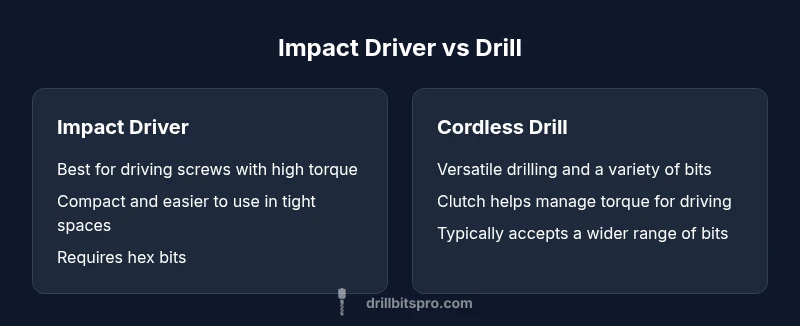
Impact Driver vs Drill: Practical Comparison
A detailed, objective comparison of impact drivers and drills, with practical guidance for DIYers and professionals on when to use each tool. Learn how to choose the right tool for fastening and drilling tasks.


Impact drivers and drills serve different roles in fastening and drilling tasks. An impact driver excels at driving screws with high torque and minimal cam-out, while a drill provides steady rotation for drilling holes and versatile bit work. For most projects, start with a drill/driver for general work, and add an impact driver when fasteners become a bottleneck or you face stubborn screws.
The Core Question: Why use impact or drill for common tasks
Choosing between an impact driver and a drill is not about which tool is better overall; it’s about which tool best fits the task at hand. The phrase why use impact or drill appears frequently as a guiding question for DIYers and professionals who want to optimize speed, control, and finish quality. In short, you use an impact driver where torque and drive stability matter most, and you use a drill when you need precision drilling and versatile bit work. According to Drill Bits Pro, the best approach is task-first, not brand-first, and to adopt a two-tool mindset when your projects span fastening and drilling. This section introduces the core distinction and sets the framework for deeper comparisons to come.
The Drill Bits Pro team found that most users underestimate how often a dedicated impact driver can prevent cam-out and user fatigue, especially on hardwoods and dense composites. The practical takeaway is simple: measure the torque demand of your screws, then decide if an impact is necessary for speed and control. When you seek versatility and a single-tool setup, a drill/driver remains a solid starting point, with an upgrade path to an impact driver as tasks scale up.
The phrase why use impact or drill also anchors considerations of material, bit type, and workspace ergonomics, which we will explore in the following sections.
Comparison
| Feature | Impact Driver | Cordless Drill (Drill/Driver) |
|---|---|---|
| Primary function | Driving screws with high torque and minimal cam-out | Drilling holes and light-to-moderate driving, with clutch-controlled torque |
| Torque range | Very high torque with percussive action | Moderate to high torque with clutch for controlled driving |
| Chuck type | 1/4 inch hex shank (quick-change bits) | Keyless chuck (3/8 inch or 1/2 inch common) for broad bit compatibility |
| Speed characteristics | Low to moderate RPM with high torque output | Higher RPMs optimized for drilling and faster bit rotation |
| Best materials | Hardwoods, dense composites, thick fasteners | Wood, plastics, light metals; masonry with proper bits |
| Weight and size | Typically lighter and more compact in many models | Often heavier; better balance for long drilling sessions |
| Power source | Usually 18V or higher, designed for short bursts of high torque | 18V or higher with larger capacity battery options |
| Price range | Moderate to high depending on model and torque | Low to moderate; great value for versatility |
| Best for | Fastening in tight spaces and stubborn fasteners | General drilling, pilot holes, and mixed fastening tasks |
What's Good
- Accelerates fastening with high torque and low effort
- Compact form factors fit into tight workspaces
- Reduces cam-out on hard materials, preserving bit and screw heads
- Drills offer versatile performance for hole-making and varied fasteners
- Two-tool setups can cover most projects efficiently
Negatives
- Impact drivers can feel aggressive to untrained users
- Special hex bits are typically required; not all bits fit traditional chucks
- Drills may be less efficient at heavy screw driving without a dedicated impact
- Two tools require more storage and initial investment
Impact driver and drill each shine in their lanes; for most tasks, a drill/driver covers drilling while an impact driver handles fastening.
Choose the tool by task: use an impact driver for high-torque fasteners and cam-out resistance; reserve your drill for holes and versatile bit work. A combined setup offers the best overall versatility for DIYers and professionals alike.
Got Questions?
What is the main difference between an impact driver and a drill?
An impact driver delivers high torque with percussive impacts to drive screws, while a drill provides steady rotational force for drilling holes and controlled driving. The choice depends on task demands and material.
An impact driver hammers torque to drive fasteners; a drill spins steadily for holes and lighter driving. Pick based on the task at hand.
Can I use an impact driver for drilling holes?
An impact driver is not designed for drilling holes; it lacks a reliable chuck and consistent rotation. Use a drill or drill/driver for holes.
No—use a drill for holes; impact drivers are meant for fastening.
Should I buy a drill/driver or an impact driver first?
If you mainly fasten, start with a drill/driver; if you frequently fasten heavy screws, add an impact driver later for speed and torque.
Start with a drill/driver for versatility, then add an impact driver if you do a lot of fastening.
Are there safety concerns when using an impact driver?
Yes. The high torque can cause wrist strain if not controlled; always grip firmly, use appropriate bits, and wear protective eyewear.
Yes—watch torque, maintain a firm grip, and wear PPE.
What battery size should I look for?
Choose at least a mid-to-high capacity battery (e.g., 2.0–4.0 Ah range) for longer runtime and consistent performance.
Look for mid-to-high capacity batteries for longer runtime and steady power.
Can I rely on a drill to drive large fasteners efficiently?
A drill can drive screws, especially with a clutch, but for high-torque speeding and resisting cam-out, an impact driver is preferable.
A drill can do screws, but an impact driver handles tough fasteners better.
Top Takeaways
- Assess task scope before tool selection
- Use an impact driver for high-torque fastening and tight spaces
- Rely on a drill for drilling holes and general driving
- Consider a two-tool setup for maximum versatility
- Balance power, ergonomics, and budget in your purchase